
Download PrintConductor – Free, Secure, and Efficient Document Printing Tool for Windows
PrintConductor is a powerful, lightweight, and free software designed exclusively for Windows users who need to print large volumes of documents efficiently. Whether you're managing office workflows, preparing reports, or handling academic assignments, this tool streamlines the printing process with advanced batch printing capabilities. Since its launch in 2007, PrintConductor has gained a loyal user base, amassing over 12,500 downloads and maintaining consistent popularity in countries like Lithuania, Vietnam, and the United Kingdom.
Despite its age, the software remains functional and reliable, thanks to its minimal system requirements and stable performance. With version 1.2 released on February 7, 2007, PrintConductor continues to be a go-to solution for users seeking a no-frills, secure, and fast way to print multiple files without manual intervention. It supports various file formats, including PDF, DOC, DOCX, TXT, and more, making it a versatile tool for both home and business users.
The software is ideal for anyone tired of clicking “Print” one file at a time. PrintConductor automates the process, saving time and reducing human error. Its intuitive interface ensures even beginners can start printing in minutes.
With no ads, no subscriptions, and a completely free model, it’s one of the most trusted tools in the printing utilities category.
Key Features of PrintConductor
PrintConductor stands out in the crowded field of printing utilities due to its robust feature set and user-friendly design. One of its most powerful features is batch printing, which allows users to select multiple documents from different folders and print them in a single operation. This eliminates the need to open each file individually, significantly reducing time and effort—especially useful in office environments with high-volume printing demands. The software supports a wide range of file formats, including PDF, DOC, DOCX, TXT, RTF, HTML, and even image files like JPG and PNG, making it a versatile solution for diverse document types.
Another standout feature is its ability to handle print settings efficiently. Users can set default printer preferences, adjust page ranges, specify copies, and choose collation—all before initiating the batch process. This ensures consistency across all printed documents. PrintConductor also includes a print queue manager, which helps users monitor ongoing print jobs, pause, resume, or cancel tasks as needed. This is particularly useful when printing large files or when the printer becomes unresponsive.
For enhanced security and reliability, the software operates without requiring administrator rights, making it safe for use in corporate environments with strict IT policies. It’s also designed to be lightweight—taking up minimal disk space and RAM—so it won’t slow down older or low-spec Windows systems. Additionally, PrintConductor supports drag-and-drop functionality, allowing users to simply drag files into the interface to add them to the print queue. With its simple yet powerful interface, PrintConductor delivers a seamless experience that combines efficiency, flexibility, and ease of use.
How to Install and Use PrintConductor
Installing PrintConductor is a straightforward process that takes less than a minute. Since it’s a portable application, you don’t need to go through a traditional installation wizard. Simply download the ZIP file from the official website, extract it to a folder of your choice (such as your Documents or Downloads folder), and run the executable file (PrintConductor.exe). No admin rights are required, and the software leaves no traces in the Windows Registry, making it safe to use on shared or restricted systems.
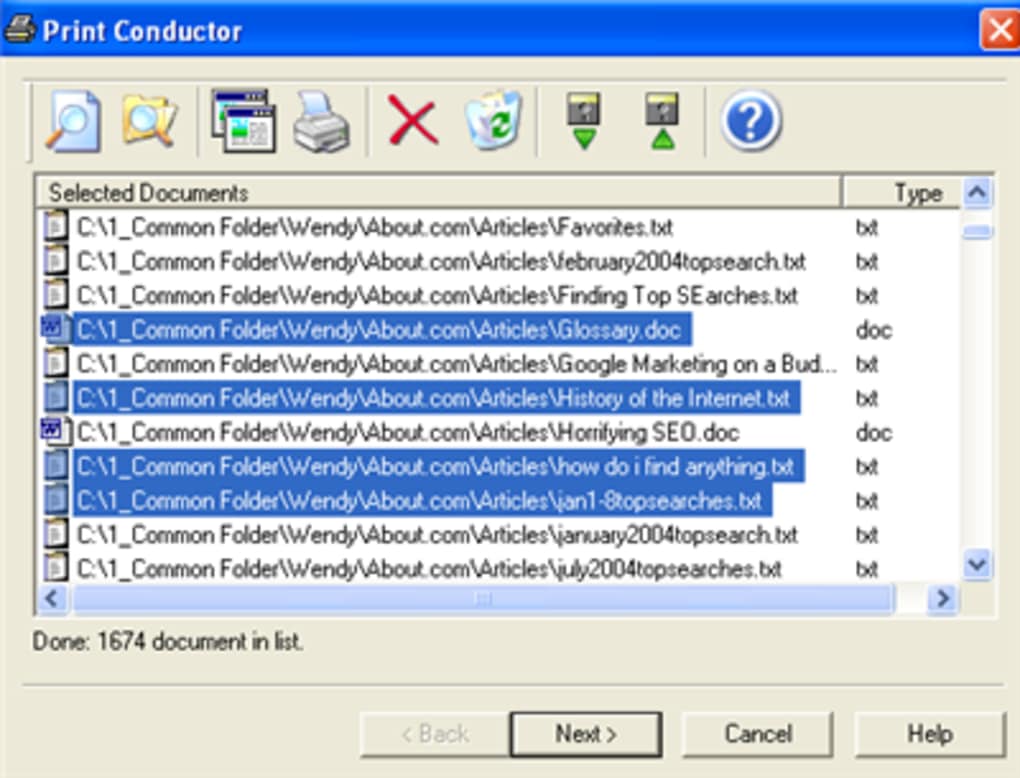
Once launched, the main interface displays a clean, minimalist layout. To begin printing, click the “Add Files” button or simply drag and drop your documents into the window. You can add files from multiple folders at once, and the software will automatically detect their formats. After adding your files, configure your print settings—such as printer selection, number of copies, page range, and orientation—using the options panel. You can also apply the same settings to all documents or customize each one individually.
When everything is set, click the “Print” button to start the batch process. PrintConductor will process each file sequentially, showing a progress bar and status updates. If an error occurs with a specific file (e.g., corrupted PDF), the software will skip it and continue with the rest, ensuring no job is halted due to a single issue. After printing, you can export the print log to a text file for record-keeping, which is helpful for audits or tracking printing history. This level of control and transparency makes PrintConductor a trusted tool for both personal and professional use.
Compatibility and System Requirements
PrintConductor is designed exclusively for Windows operating systems and is compatible with Windows 95 and all subsequent versions, including Windows XP, Vista, 7, 8, 8.1, and Windows 10. This broad compatibility ensures that even users with older systems can benefit from its features without needing to upgrade hardware or software. The software is particularly well-suited for legacy systems in small businesses, schools, and government offices where modern software may not run smoothly.
Despite being over 15 years old, PrintConductor remains functional and secure thanks to its lightweight architecture and minimal dependencies. It doesn’t require .NET Framework or any additional runtime libraries, which reduces the risk of compatibility issues. The application is also fully portable, meaning it can be run directly from a USB drive, making it ideal for temporary use on public or shared computers.
While PrintConductor is currently only available for Windows, its core functionality—batch printing, format support, and print queue management—makes it a strong alternative to more complex and expensive solutions. Users on Mac or Linux can explore virtualization or cloud-based printing tools, but for Windows users, this remains one of the most reliable and efficient free printing tools available. It’s also worth noting that the software has been widely used in countries like Lithuania, Vietnam, and the UK, indicating its global appeal and reliability across different network environments and printer models.
Pros and Cons of PrintConductor
Pros
- Completely free and ad-free – No hidden costs or intrusive ads, making it ideal for budget-conscious users.
- Lightweight and fast – Minimal system resource usage ensures smooth performance even on older hardware.
- Supports multiple file formats – Works with PDF, DOC, DOCX, TXT, HTML, and image files.
- Batch printing with customizable settings – Print multiple documents with individual or shared configurations.
- Portable and no installation needed – Run from USB or any folder without leaving system traces.
- Print queue management – Monitor, pause, resume, or cancel jobs in real time.
- Safe and secure – No admin rights required and no registry modifications.
Cons
- Windows-only – Not available for Mac, Linux, Android, or iOS.
- No recent updates – Last update was in 2007, which may raise concerns about modern security patches.
- Limited user interface – Basic design may feel outdated compared to modern apps.
- No cloud integration – Cannot print from cloud storage services directly.
- No mobile app – Cannot manage printing from smartphones or tablets.
Frequently Asked Questions (FAQ)
Can I use PrintConductor on Windows 10?
Yes, PrintConductor is fully compatible with Windows 10. It runs without issues on both 32-bit and 64-bit versions, and since it’s a portable app, it doesn’t require installation.
Is PrintConductor safe to download and use?
Yes, the software is safe and secure. It’s a lightweight, portable application with no known malware. It doesn’t modify the registry and doesn’t require admin rights, reducing security risks.
Can I print only specific pages of a document?
Absolutely. PrintConductor allows you to specify page ranges (e.g., 1-5, 10, 15-20) for each file individually or apply the same range to all documents in the batch.
Does PrintConductor support PDF printing?
Yes, PDF files are fully supported. PrintConductor can print PDFs directly without requiring Adobe Reader to be installed.
Can I run PrintConductor from a USB drive?
Yes, PrintConductor is portable. Simply extract the files to a USB drive and run the .exe file directly from the drive on any Windows PC.
Conclusion: Why PrintConductor Remains a Top Choice
If you're a Windows user looking for a reliable, free, and efficient way to print large numbers of documents, PrintConductor is an excellent choice. Despite its age, the software continues to deliver consistent performance, thanks to its lightweight design, broad compatibility, and powerful batch printing features. It’s ideal for students, office workers, educators, and small businesses that need to streamline printing workflows without investing in expensive software.
While it lacks modern features like cloud integration and mobile support, its core functionality remains unmatched in the free printing utilities space. With no ads, no subscriptions, and a simple, intuitive interface, PrintConductor offers real value for users who prioritize speed, security, and simplicity.
Download PrintConductor today and experience hassle-free batch printing. Whether you're preparing for a presentation, printing academic papers, or managing office documents, this free tool will save you time and effort. It’s a proven, trusted solution that continues to deliver—over 15 years after its release.







